Imagine two AI scheduling assistants: one can copy-edit meeting agendas, while the other can check invitees’ calendars, find free time, and send meeting invitations. Both rely on the same AI model, but their capabilities are quite different. Their capabilities depend on the software that surrounds and supports the AI model, called the harness.
What Is an Agent Harness?
An agent harness (also called an agentic harness, or simply a harness) is the software around an AI model that runs its execution loop: it carries out the model’s requests to use tools, returns the results, and controls what information the model receives and what it is allowed to do.
At its core, a large language model (LLM) generates data by predicting what comes next in a sequence. It can generate structured requests to check a calendar or send an invitation, but it cannot perform these actions on its own. To act, it must ask other applications to do things for it by outputting commands. An agent harness handles each such request: it checks permissions, calls the appropriate tool, and returns the result to the AI model. The AI model can then request another action, or return an output to the end user. This cycle of request, action, and result is the execution loop. Running this loop is what transforms an AI model from a simple chatbot into an AI agent that can persistently work through a task, rather than just replying to a prompt.
For our AI scheduling assistant, the AI model at the center of the AI experience might request a calendar check by writing a tool call. The harness detects that request and calls the calendar tool, returning the invitees’ availability to the AI model. The AI model then uses that information to propose a meeting time to the user or request another check by using another tool. The diagram below shows a simplified loop; real systems can also run several tool operations between model calls.
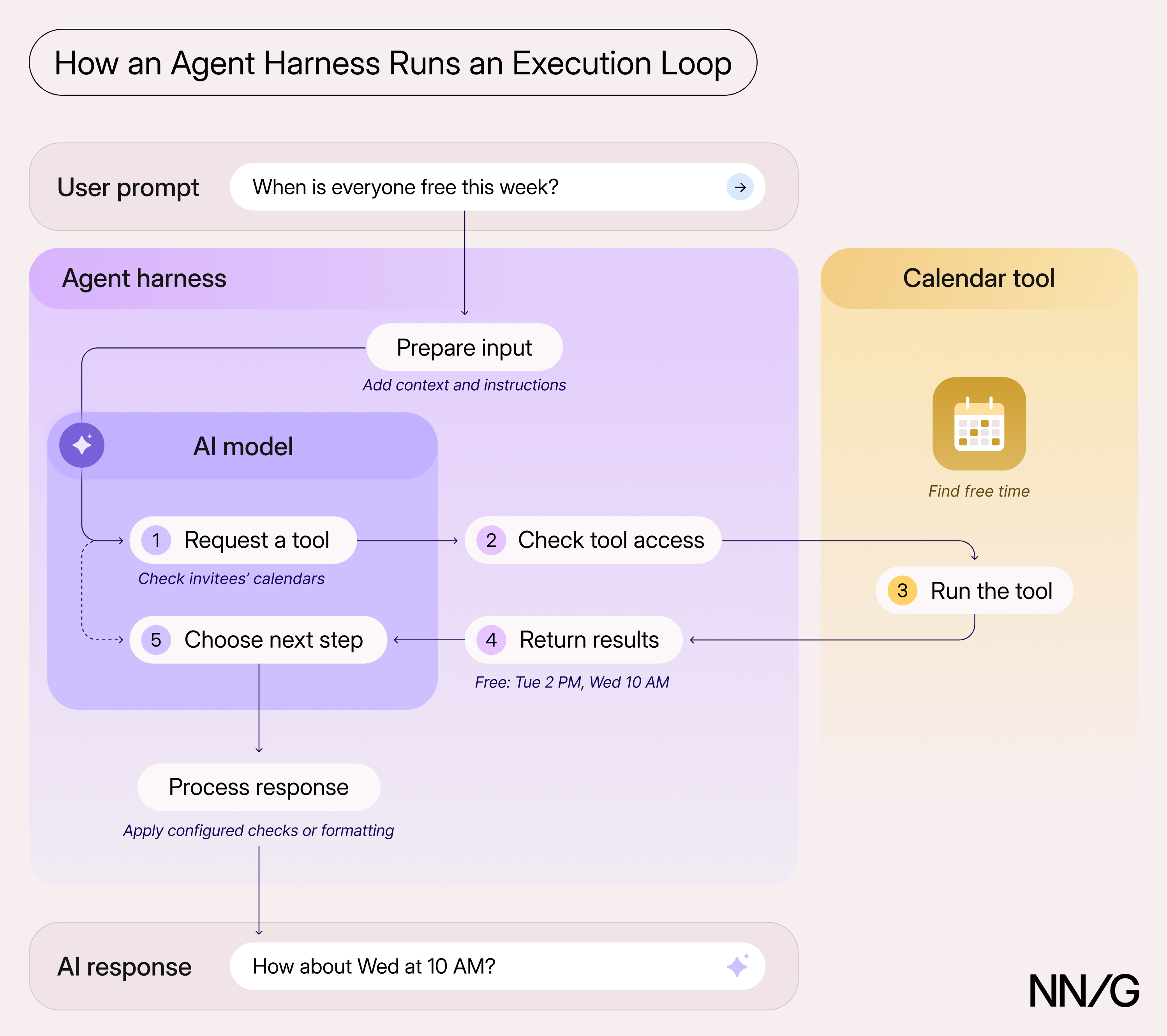
With an AI product, feature, or service, the user interface, harness, and AI model work together to provide a good user experience. For example, the harness specifies when the user should be asked for permission (e.g., through a confirmation dialog) and ensures that the user is asked to review the invitation before it is added to the calendar.
Tasks Performed by the Harness
Alongside running the execution loop, the agent harness supports the model’s work by:
- Supplying context
- Connecting tools and enforcing permissions
- Providing instructions and enforcing limits
Supplying Context
For each task, an agent harness assembles the context the AI model needs, including the user’s request, the developers’ instructions, previous messages, saved preferences, and information from connected calendars or documents. Saved information is useful only if the harness passes it to the model.
For our AI scheduling assistant, that might mean providing calendars, working hours, and a preference to, for example, keep Fridays free of meetings. If the Friday preference is never delivered to the model as part of its working context, the assistant may suggest a time the user would rather avoid, so the user would then have to repeat a preference the assistant should already have.
An agent harness can also change how information is presented to the model. Suppose you upload a PDF of a journey map to an AI tool for feedback. One product's agent harness might process the PDF and provide the model only the extracted text, while another might also convert the pages into images. The model receiving only text may miss relationships conveyed by the layout, even though both products can access the same file.
Connecting Tools and Enforcing Permissions
An agent harness allows the AI model to retrieve information from various tools and take actions beyond outputting text. Reading a calendar, checking a colleague's availability, and sending an invitation are operations that can require different permissions, even when a single calendar tool offers them all.
The harness controls which connected tools the model can use and when user approval is required. The connector and the underlying application also enforce their own access permissions and application rules. For example, a calendar connection might permit reading availability but not creating events; even if it permits both, the harness can require approval before calling the tool that sends an invitation. These controls work together: approval from the harness does not override restrictions in the connected application.
Providing Instructions and Enforcing Limits
An agent harness provides instructions that guide the model’s work and enforces limits on time, cost, and the number of steps the model can take before returning to the user. It coordinates repeated exchanges between the model and its tools and pauses work when human input is required. Within the boundaries that an agent harness establishes, an AI model can decide what to do next with the tools afforded to it and whether to continue its execution loop.
Suppose our scheduling assistant finds no time that works for all invited guests within the specified date range. That particular search is finished, but the user’s request and task isn’t, and the model might keep requesting new searches unless something stops it. Alternatively, the assistant could ask the organizer whether any attendees are optional, suggest searching another week, or stop and explain the conflict. The best response depends on the particular user’s needs and expectations.
The team designing the scheduling product could decide when the assistant should stop, ask for help, or explain the conflict. The harness can enforce hard limits on execution and give the model behavioral instructions about which responses to prefer, although the model may not always follow them. The harness can also inspect the model’s response and request another if it breaks a guardrail. Designing an agent harness involves many human-centered design decisions.
Why the Harness Matters for UX
Agent-harness configurations affect what an AI product can accomplish and how much work users must do themselves. Many harness decisions involve engineering or product tradeoffs with direct consequences for UX. UX practitioners should help define the behavior users need and evaluate whether the entire AI system supports it.
When Using AI, Check Whether the Product Supports the Task
Knowing which AI model a product uses does not tell you whether its harness can support your particular task. Check its connections, permissions, and work limits. A scheduling product without access to the relevant calendars may leave the user copying availability into chat and sending invitations themselves. Compare products using the same tasks and inputs. Differences in output are a reason to investigate the system; they do not, by themselves, identify the cause.
When Designing AI Experiences, Specify Behavior Alongside the Screen
Specify how the system carries out the actions available in the interface. If a new connector exposes many read and write capabilities, work with engineers to set reasonable defaults and design the permission dialogs users will see. For example, if users can mark Fridays as unavailable, define how the harness saves that preference and supplies it to the AI model. If users can cancel a task, define what stops and what happens to actions already completed. Work with engineering early to decide which actions require approval and how the system enforces that approval behind the confirmation dialog. Connector and harness capabilities should work together to give users a smooth experience.
When Evaluating AI Experiences, Test the Entire Task
When running AI evals, test the entire task your AI experience supports, using realistic context, tools, and permissions. For an AI scheduling assistant, whether an agent writes an invitation well does not prove that the system successfully checks availability or waits for approval. Include tests where a user disconnects a calendar connection, a user preference changes, or no time works for everyone. Record each outcome, along with the effort users spend checking and correcting the results. When something fails, work with engineering to determine which part of the system broke: the interface, the harness, or the core AI model.
Conclusion
An agent harness shapes what an AI product can accomplish and how much work users do themselves. Its context, tools, instructions, and limits are product and engineering decisions with real consequences for UX. Understanding the execution loop gives UX practitioners a way to ask what information the AI model receives, which actions can run, and when the system should stop or involve the user.